
 SAM
SAM=Navigation%20(Current)12-2.png?width=17&height=17&name=Navigation%20(Current)=Navigation%20(Current)12-2.png) Maintenance
Maintenance =Navigation%20(Current)12-3.png?width=17&height=17&name=Navigation%20(Current)=Navigation%20(Current)12-3.png) Capital
Capital  About us
  Contact Us
  Careers
  Customer Success Stories
=Navigation%20(Current)12-4.png?width=17&height=17&name=Navigation%20(Current)=Navigation%20(Current)12-4.png) SuiteSpot Accelerate™
SuiteSpot Accelerate™ Newsroom
 Integrations
 Resource Centre
 FAQ
FAQ Request a Demo
=Navigation%20(Current)12-1.png?width=17&height=17&name=Navigation%20(Current)=Navigation%20(Current)12-1.png) SAM™ Maintenance Request
SAM™ Maintenance Request SAM™ Supervisor
=Navigation%20(Current)12.png?width=17&height=17&name=Navigation%20(Current)=Navigation%20(Current)12.png) SAM™ Technician
SAM™ Technician SAM™ Capital Manager
The Apartment Make Ready Process: A Practical Guide for Operators
Overview
The apartment make ready process prepares a vacated unit for the next resident. A consistent process protects the ready date, controls cost, documents responsibility, and reduces service issues after move in. The exact scope varies by property and unit, but the operating sequence should be clear.
The Make Ready Process
1. Open the Turn at Notice
Create the turn record when notice is received. Capture move out date, expected ready date, next move in if known, unit type, property standard, and any known access or resident considerations. Use the lead time to plan inspections, internal capacity, vendors, and commonly required materials.
2. Conduct the Move Out Inspection
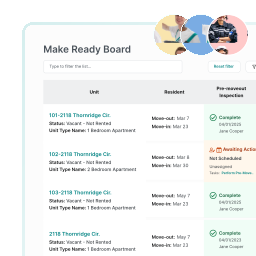
Document condition with notes and evidence. Identify resident responsibility, maintenance work, replacements, cleaning, safety issues, and items that require an estimate or approval. The inspection should create the scope directly. Avoid transferring the same findings into several tools.
3. Confirm Scope, Cost, and Ownership
Group work by trade, assign internal or vendor responsibility, set target dates, and route approvals. Standard scopes and pricing can accelerate common decisions. If the scope changes after work begins, record the reason and effect on cost and schedule.
4. Sequence the Work
Schedule tasks according to dependencies. Repairs may need to happen before paint. Paint may precede flooring. Final cleaning should follow the work most likely to create dust or debris.
Identify the critical path and protect it. Tasks that can happen in parallel should not wait unnecessarily.
5. Execute and Update in Real Time
Technicians and vendors should work from the same scope and documentation requirements. Status should reflect what is happening, including waiting on part, approval, access, vendor, or follow up. Property and regional teams should be able to see progress without a separate status meeting.
6. Complete Quality Control
The final inspection should confirm that the unit meets the property standard and that required systems, appliances, fixtures, safety items, and finishes are ready. Photos, readings, keys, asset updates, chargeback evidence, and unresolved exceptions should be completed before handoff.
7. Release the Unit to Leasing
Use a clear handoff rather than an informal message. Record the ready date, final condition, any approved exceptions, and the person who confirmed readiness. Leasing should know the unit is available based on the same record the maintenance team completed.
8. Review Performance
Measure turn duration, active work time, waiting time, cost, scope change, vendor performance, rework, and delay reasons. Review the process by property and work type. The goal is to identify repeatable opportunities, not to compare unlike communities without context.
Build a Process That Can Scale
The strongest make ready process is consistent enough to measure and flexible enough to reflect the property. Software should reinforce the sequence, make delays visible, and connect every team to the same record. SuiteSpot manages apartment turns from notice and inspection through scope, execution, quality control, and portfolio reporting.
Use one shared turn plan from notice through final quality check.
Faster Turns. Smarter Work.
See How SuiteSpot Can Streamline Your Maintenance
 Book a Demo
Blog
Resource library
Subscribe to learn about new product features, the latest in technology, solutions, and updates.